ScaleAQ Endpoint Security

We are taking further steps to ensure control of all computers and business related data stored on the computer or on mobile devices. The trusted Cisco Antivirus will be replaced by the new leading market player Microsoft Defender Advanced Threat Protection. In addition to better protecting the computer this allows for a tighter more correlated data flow to our partner on Cyber Security. With this we move from legacy antivirus to intelligent detection and response capabilities to disrupt ransomware and other sophisticated threats.

We are taking further steps to ensure control of all computers and business related data stored on the computer or on mobile devices.

The trusted Cisco Antivirus will be replaced by the new leading market player Microsoft Defender Advanced Threat Protection. In addition to better protecting the computer this allows for a tighter more correlated data flow to our partner on Cyber Security. With this we move from legacy antivirus to intelligent detection and response capabilities to disrupt ransomware and other sophisticated threats.

Admin OnDemand will be a tool allowing us to run the computers in a “User mode” where no malware or other software is allowed to run. The end user can elevate to “Admin mode” to make needed software changes. There is an option to make users permanent admin for those who requires this to do their job.

We are also handing more of the endpoint management over to our IT partner Advania. All software install has been repackaged and tested. These apps will be found in the Company Portal like before.

To implement this, we need to do a redeploy of Windows computers, they need to be reset like we did earlier. On the bottom of the page you can see the dates for each office, they are subject to change.

Important to note: All data not stored on OneDrive or SharePoint will be deleted.

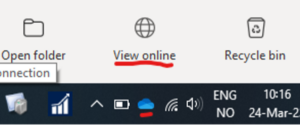
Files on your Desktop, Pictures and Documents folder should be set up to automatically synchronize with OneDrive. This is not guaranteed however. Click the OneDrive icon in the right corner and choose “View online” to see what files that are stored in the cloud, not only on your computer.

Anything stored in other folders needs to be moved to OneDrive. There is a video and PDF below showing how to backup files manually. Bookmarks in web browsers needs to be exported and saved in OneDrive. If you synchronize Edge with your ScaleAQ account, bookmarks, passwords and more will be stored in the cloud.

More info will follow later.

[vc_raw_html]JTVCdGFibGUlMjBpZCUzRDYwJTIwJTJGJTVE[/vc_raw_html]

[kontaktperson_single]

You must be logged in to post a comment.

ScaleAQ Endpoint Security

We are taking further steps to ensure control of all computers and business related data stored on the computer or on mobile devices. The trusted Cisco Antivirus will be replaced by the new leading market player Microsoft Defender Advanced Threat Protection. In addition to better protecting the computer this allows for a tighter more correlated data flow to our partner on Cyber Security. With this we move from legacy antivirus to intelligent detection and response capabilities to disrupt ransomware and other sophisticated threats.

We are taking further steps to ensure control of all computers and business related data stored on the computer or on mobile devices.

The trusted Cisco Antivirus will be replaced by the new leading market player Microsoft Defender Advanced Threat Protection. In addition to better protecting the computer this allows for a tighter more correlated data flow to our partner on Cyber Security. With this we move from legacy antivirus to intelligent detection and response capabilities to disrupt ransomware and other sophisticated threats.

Admin OnDemand will be a tool allowing us to run the computers in a “User mode” where no malware or other software is allowed to run. The end user can elevate to “Admin mode” to make needed software changes. There is an option to make users permanent admin for those who requires this to do their job.

We are also handing more of the endpoint management over to our IT partner Advania. All software install has been repackaged and tested. These apps will be found in the Company Portal like before.

To implement this, we need to do a redeploy of Windows computers, they need to be reset like we did earlier. On the bottom of the page you can see the dates for each office, they are subject to change.

Important to note: All data not stored on OneDrive or SharePoint will be deleted.

Files on your Desktop, Pictures and Documents folder should be set up to automatically synchronize with OneDrive. This is not guaranteed however. Click the OneDrive icon in the right corner and choose “View online” to see what files that are stored in the cloud, not only on your computer.

Anything stored in other folders needs to be moved to OneDrive. There is a video and PDF below showing how to backup files manually. Bookmarks in web browsers needs to be exported and saved in OneDrive. If you synchronize Edge with your ScaleAQ account, bookmarks, passwords and more will be stored in the cloud.

More info will follow later.

[vc_raw_html]JTVCdGFibGUlMjBpZCUzRDYwJTIwJTJGJTVE[/vc_raw_html]

[kontaktperson_single]

You must be logged in to post a comment.
keyboard_arrow_up