

Spoofing
Please note we are seeing a lot of fake spoofed calls and SMS messages to our company.
Unfortunately, there is little the phone providers can do now to prevent SMS and Phone calls from pretending to be from a different number than it has been sent from (Spoofing). This allows international criminals to call you from Norwegian numbers. If you return the call, you get to the Norwegian user that is clueless that the number has been used.
Telenor and Unifon protect against our numbers being used for spoofing, yet we do receive incoming SMS and calls at an increasing rate.
A typical SMS like the one below pretends to inform you about a product you use. Microsoft login data is quite valuable for a criminal, so this is one of the items they are looking for.
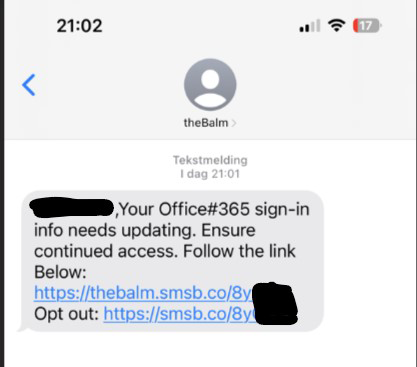
Also be alert on calls pretending to be directly from Microsoft, you should never receive such a call and just hang up.
More information in Norwegian at Telenor:
Wangiri
Also be alert about any missed calls. “Wangiri” is Japanese for “one call and cut”. The aim is to get you to return the call. The swindlers trick you into returning the call to a chargeable number and then attempt to keep you on the line for as long as possible.
More information about Wangiri from Telenor/Online.no: Ringer det fra utlandet … i bare ett sekund?
Flubot
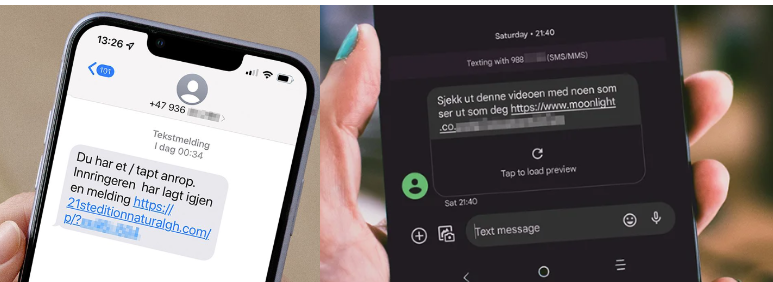
This is a old phone virus that keep reappearing mostly seen on Android phones. It is spread by tricking you to install an application via a SMS link. Once installed the attacker can track and steal data.
More information in Norwegian on Telenor: Flubot: Fem ting du må vite om mobilviruset (telenor.no)
How to stay safe
If you don’t know the caller you can help avoiding scams this way:
- Be critical – hang up if you are suspicious.
- Be critical – never click a link if you are suspicious. If it states to be from some service you use go to that website instead. Typically they try to stress you regarding Bank / Skatteetaten / Payments / Office 365 access or storage.
- If the caller states, you have a virus on your computer – hang up.
- Never download or install software if you are asked to do so from an unknown source.
- Never hand out sensitive information.
- Remember no professional company will ask you for personal information.
- Don’t answer if you see an unknown number from aboard.
- Don’t make yourself a target. Don’t use ScaleAQ emails or phone numbers in connection with cryptocurrency.
- Do a number search on google. Check for example www.telefonterror.co.no
- If you detect it is a scam hang up and block the number.
Device Management
For company phones & laptops we use Microsoft Intune to manage and secure devices.
We use a Security Operation Centre from Advania to assist us with alerting us if one of our users or devices raises a red flag.
You can check in the “Company Portal” application that your device is compliant and meets the security requirements set. This makes for the best protection for your device.
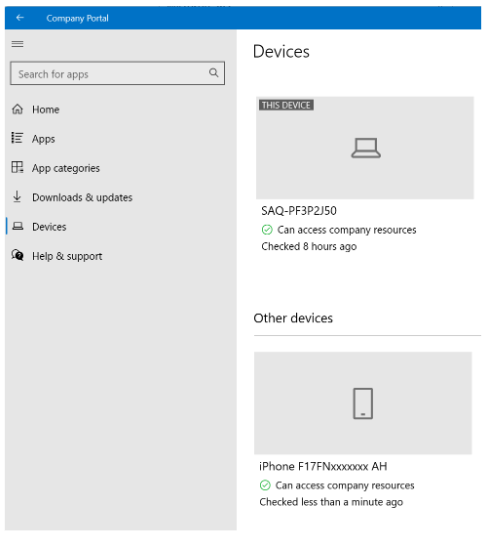
Under “Devices” you should see your company enrolled PC and company enrolled phone.
Note that you must also enroll a private phone onto Intune if you wish to use company emails on it.
Please read this intranet post for guides and more information. Mobile Device Management (MDM) – ScaleAQ Intranet
Travel Policy
When traveling abroad and bringing your company PC or Phone please refer to the policy located here: